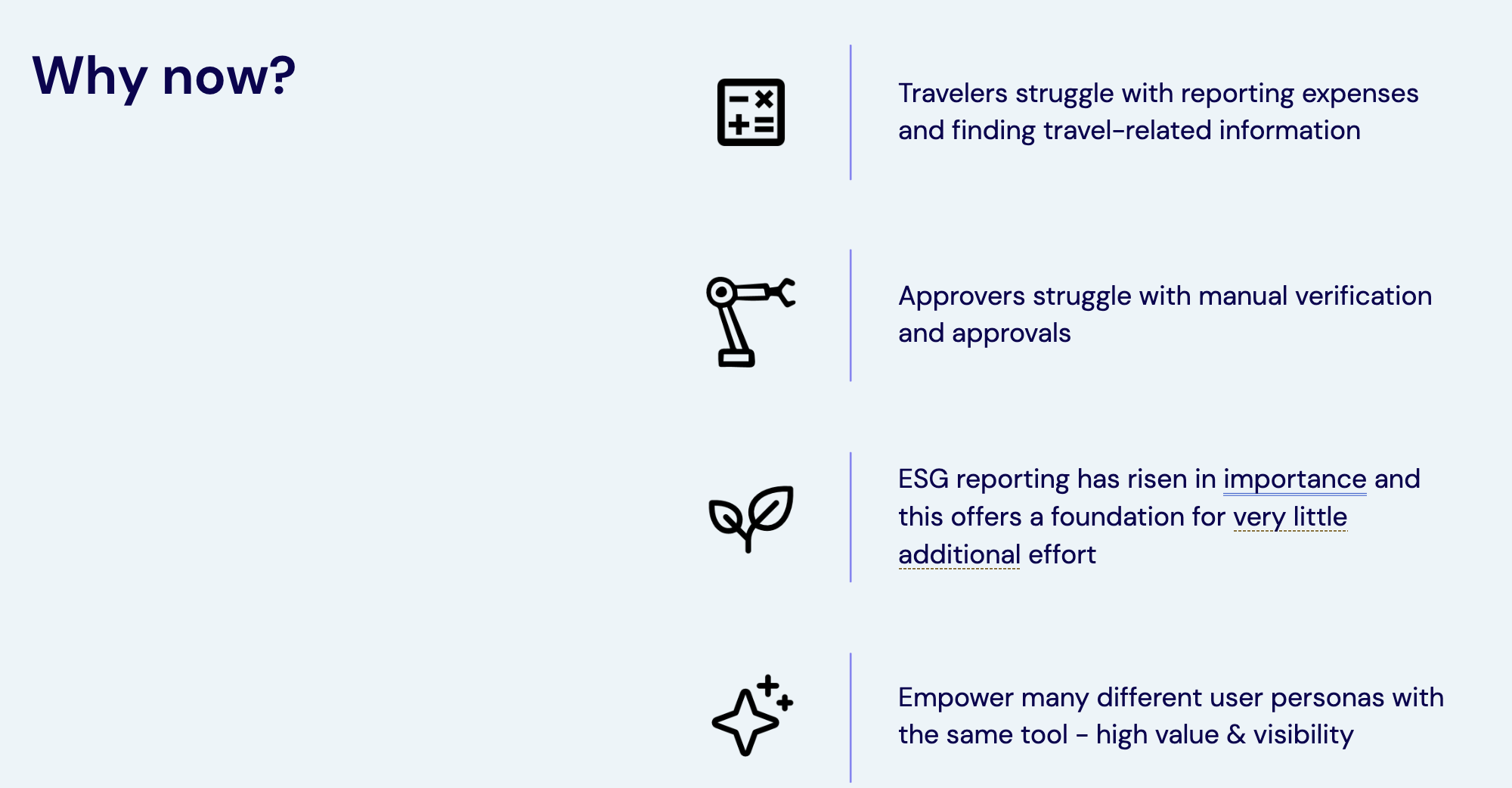
Key business drivers making this the right time for Travel Companion Agent deployment
Detailed Problem Analysis
1. Manual Time Waste
Employees spend excessive time manually entering receipt data, creating expense reports, and tracking down policy information. This reduces productivity and delays submissions.
2. Policy Confusion
Company expense policies are scattered across different documents. Employees struggle to find current guidelines, leading to non-compliant submissions and processing delays.
3. Data Quality Issues
Manual data entry leads to errors, missing information, and inconsistent formatting. This creates verification challenges and audit problems.
4. Missing ESG Data
Travel-related carbon emissions go untracked, representing missed opportunities for environmental reporting and sustainability initiatives.
How It Works
AI-powered automation for expense reporting
Core Technologies
The Travel Companion Agent leverages advanced AI and Microsoft ecosystem tools to provide seamless expense processing:
AI Receipt Processing
Azure AI Document Intelligence extracts data from receipt images with high accuracy, supporting multiple formats and currencies.
Policy Engine
Real-time validation against company policies stored in SharePoint and OneDrive, with instant feedback on compliance issues.
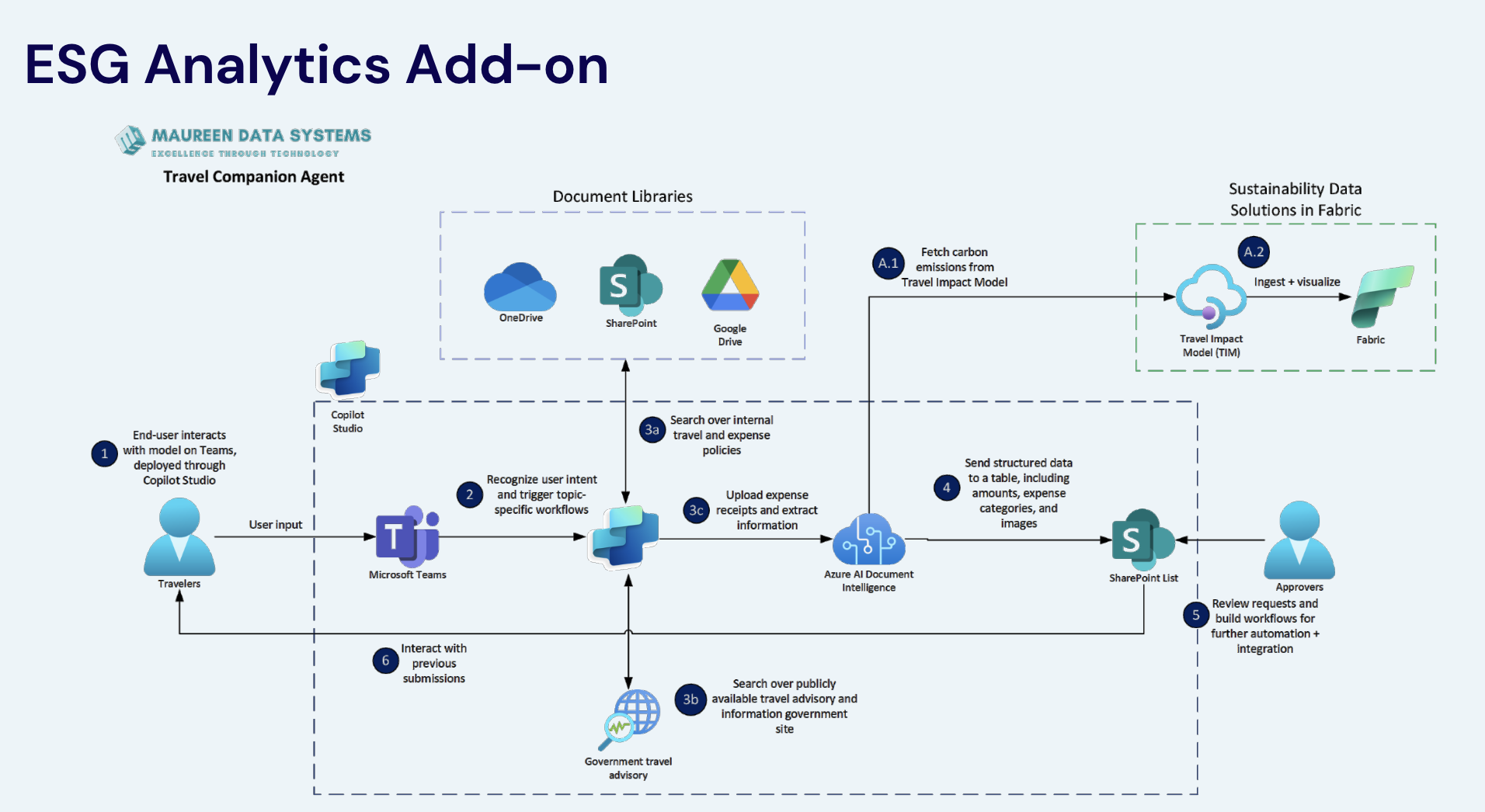
ESG Integration
Automatic carbon emission calculations using travel impact models, feeding into sustainability reporting systems.
Workflow Automation
Seamless integration with existing ERP and approval systems through Microsoft Power Platform.
Benefits & Results
Measurable improvements and business value
Quantitative Results
75%
Time Saved on Expense Reporting
90%
Reduction in Data Entry Errors
50%
Faster Approval Cycle Time
Business Value
Enhanced User Experience: Streamlined, intuitive expense submission process
Operational Efficiency: Reduces administrative burden on finance teams
Strategic Insights: Better spend visibility and analytics capabilities
Return on Investment
The combination of time savings, error reduction, and improved compliance delivers significant ROI while supporting sustainability goals and regulatory requirements.
Complete Workflow
End-to-end 6-step process for expense reporting
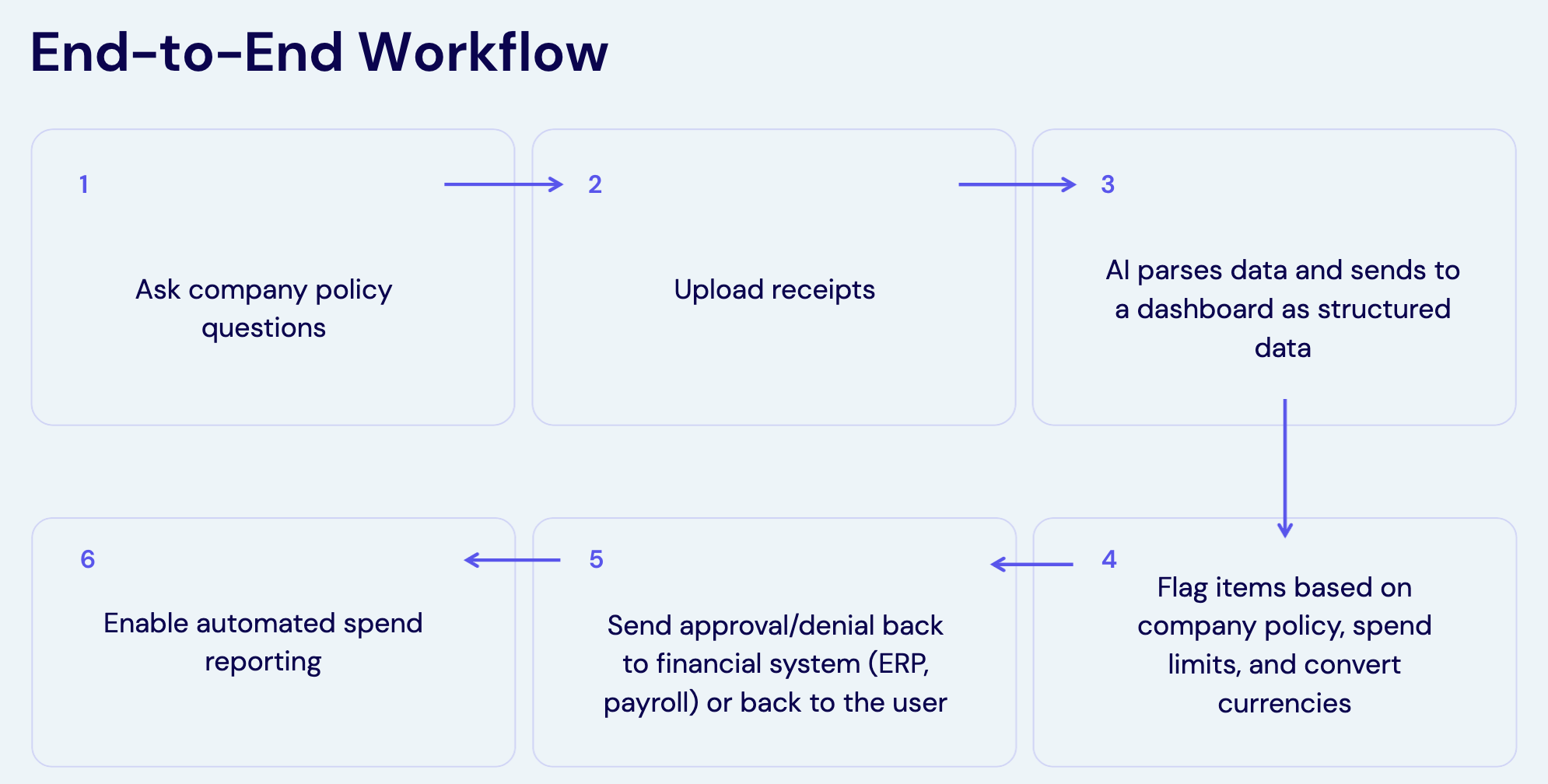
The Travel Companion Agent follows a comprehensive workflow that automates the entire expense reporting lifecycle, from initial policy questions to final ERP integration.
Workflow Overview
Complete 6-step workflow from policy questions to automated reporting
1
Ask Company Policy Questions
Employees can query the agent about travel and expense policies, getting instant answers to questions about:
Expense limits and approved categories
Reimbursable items and restrictions
Required documentation and approval processes
Travel guidelines and preferred vendors
2
Upload Receipts
Users submit expense documentation through multiple channels:
Photo capture via mobile device
Digital receipt uploads (PDF, JPG, PNG)
Email forwarding of digital receipts
Bulk upload for multiple expenses
3
AI Parses Data and Sends to Dashboard
Azure AI Document Intelligence processes receipts to extract structured data:
Vendor name, date, and transaction amount
Expense categories and tax information
Currency conversion (when applicable)
Structured data export to dashboard systems
4
Flag Items Based on Company Policy
Automated policy validation and compliance checking:
Spend limits verification against employee levels
Policy compliance for expense categories
Currency conversion to company standards
Missing information and documentation flags
5
Send Approval/Denial to Financial Systems
Integration with existing approval workflows:
Automated routing to appropriate approvers
Integration with ERP and payroll systems
Real-time status updates to employees
Exception handling for policy violations
6
Enable Automated Spend Reporting
Comprehensive reporting and analytics capabilities:
Real-time spend analytics and dashboards
ESG emissions tracking and reporting
Compliance monitoring and audit trails
Integration with business intelligence tools
Key Workflow Benefits
This automated workflow eliminates manual data entry, reduces processing time by 75%, and ensures consistent policy compliance across all expense submissions. The integration with existing systems means no disruption to current approval processes.
Technical Details
Architecture and integration information
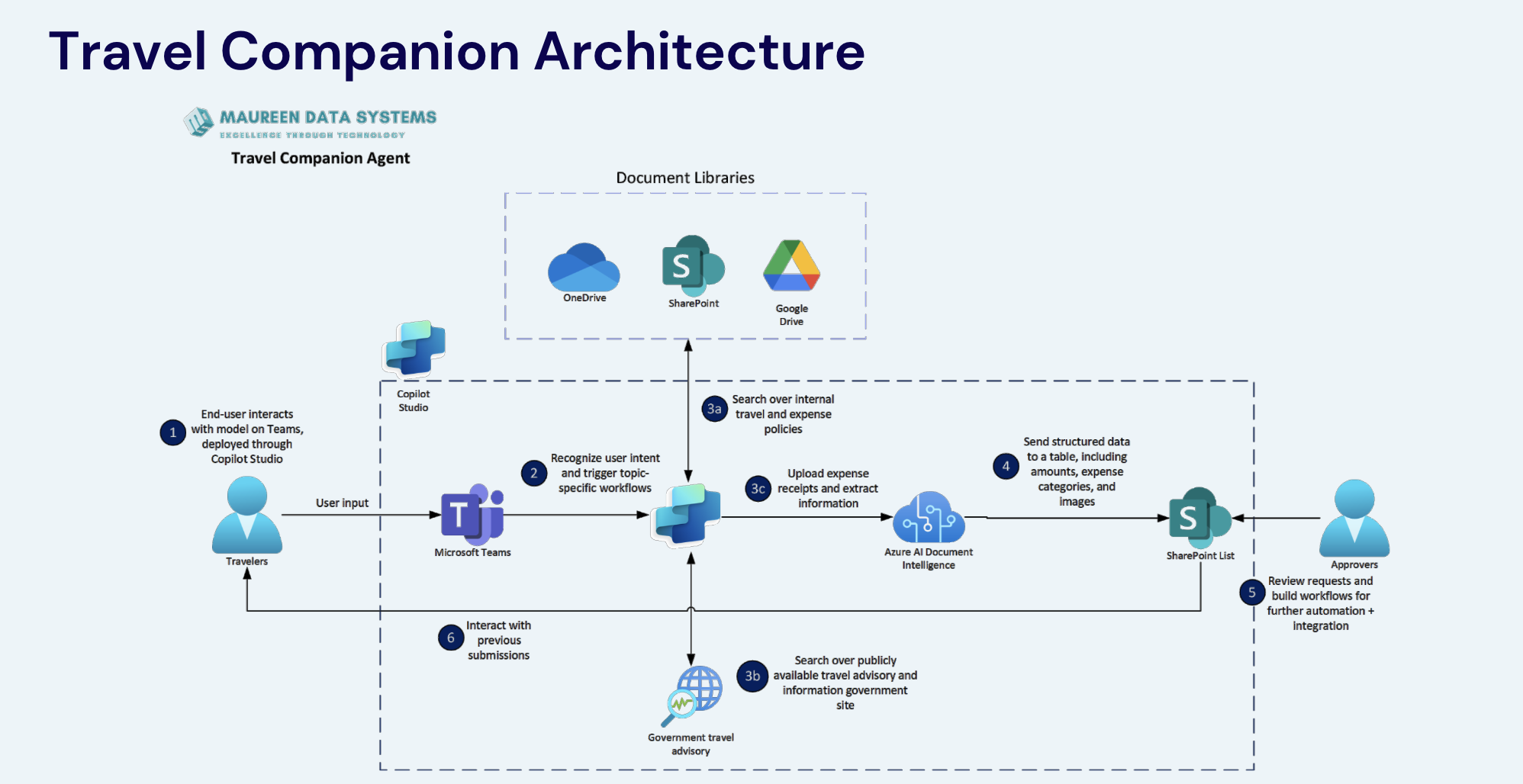
Travel Companion Agent Architecture
The Travel Companion Agent leverages Microsoft's ecosystem of tools to provide seamless integration with existing enterprise infrastructure while maintaining security and scalability.
Complete system architecture showing integration points and data flow
Core Components
1. End-User Interface
Microsoft Teams Integration: Deployed through Copilot Studio, providing users with familiar interface within their daily workflow. Travelers interact with the agent directly through Teams channels or direct messages.
Natural language processing for policy questions
File upload capabilities for receipt submission
Real-time status updates and notifications
Integration with Teams workflow and approval processes
2. Document Processing Engine
Azure AI Document Intelligence: Advanced OCR and data extraction capabilities for processing various receipt formats and currencies.
Multi-language receipt processing
Currency recognition and conversion
Vendor and category identification
Confidence scoring for data accuracy
3. Knowledge Base Integration
Document Libraries: Centralized access to company policies and travel guidelines stored across multiple platforms.
OneDrive: Personal and shared policy documents
SharePoint: Corporate travel and expense policies
Google Drive: Additional document repositories (if applicable)
4. External Data Sources
Government Travel Advisory: Real-time access to travel warnings, restrictions, and safety information from government databases.
Travel safety and security updates
Visa and documentation requirements
Health and vaccination guidelines
Currency exchange rate data
5. Output Systems
Workflow and ERP Integration: Seamless connection to existing business systems for approval and processing.
SharePoint Lists: Approval workflow management
ERP Systems: Direct integration with financial systems
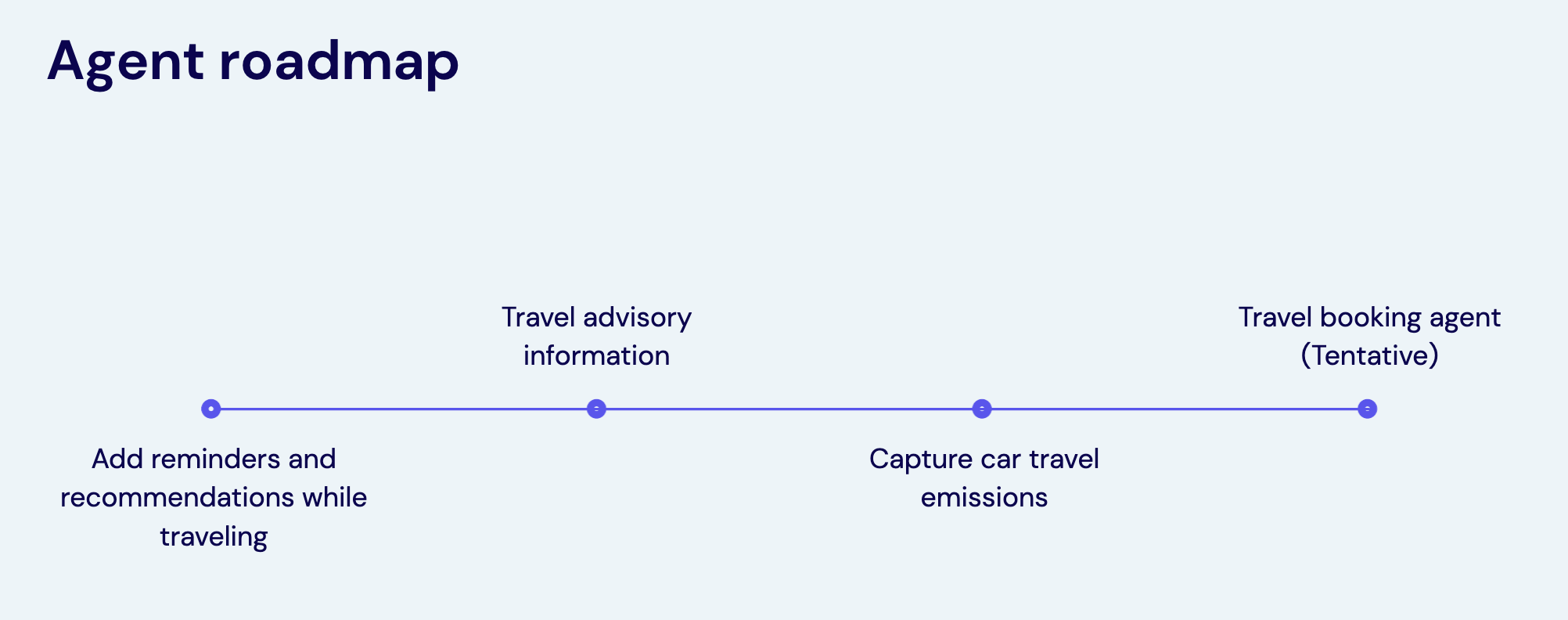
Capture Car Travel Emissions: Expanded carbon tracking for ground transportation and mileage
Phase 3: Advanced Features (Tentative)
Travel Booking Agent: Direct integration with booking platforms for seamless trip planning and cost optimization
Predictive Analytics: AI-powered spend forecasting and budget optimization recommendations
Advanced Reporting: Enhanced business intelligence and custom dashboard capabilities
Timeline Overview
The roadmap is designed to incrementally add value while maintaining system stability. Each phase builds upon previous capabilities, ensuring users can adopt new features gradually without disrupting existing workflows.
Feature Requests
Have ideas for additional features? Contact the development team to discuss potential enhancements that could benefit your organization's travel expense processes.
Frequently Asked Questions
Common questions and answers
FAQ section coming soon...
Interactive Demo
Try out the Travel Companion Agent
🚧 Demo Coming Soon
We're currently developing an interactive demo to showcase the Travel Companion Agent's capabilities. This demo will allow you to experience the complete workflow from receipt upload to expense reporting.
What to Expect
The interactive demo will include:
📸 Receipt Processing Demo
Upload sample receipts and see real-time OCR processing
Experience automatic data extraction and categorization
View policy compliance checking in action
💬 Conversational Interface
Chat with the AI agent using natural language
Ask questions about expense policies and travel guidelines
Get instant answers about travel restrictions and requirements
📊 Reporting Dashboard
View sample expense reports and analytics
See ESG impact calculations and sustainability metrics
Experience the approval workflow process
🔗 Integration Preview
See how the agent connects to Microsoft Teams
Experience SharePoint integration for approvals
View ERP system data synchronization
Timeline
The interactive demo is scheduled for release alongside the Travel Companion Agent. Users will be able to:
Access the demo through Microsoft Teams
Use sample data to test all features safely
Experience the complete user journey
Get hands-on training before full deployment
Stay Updated
We'll notify all stakeholders when the interactive demo becomes available. Contact the development team for early access opportunities or to schedule a guided walkthrough.